> ## Documentation Index
> Fetch the complete documentation index at: https://docs.payglue.io/llms.txt
> Use this file to discover all available pages before exploring further.
# Pricing table
> Embed a pricing table on your Ghost site without Stripe.
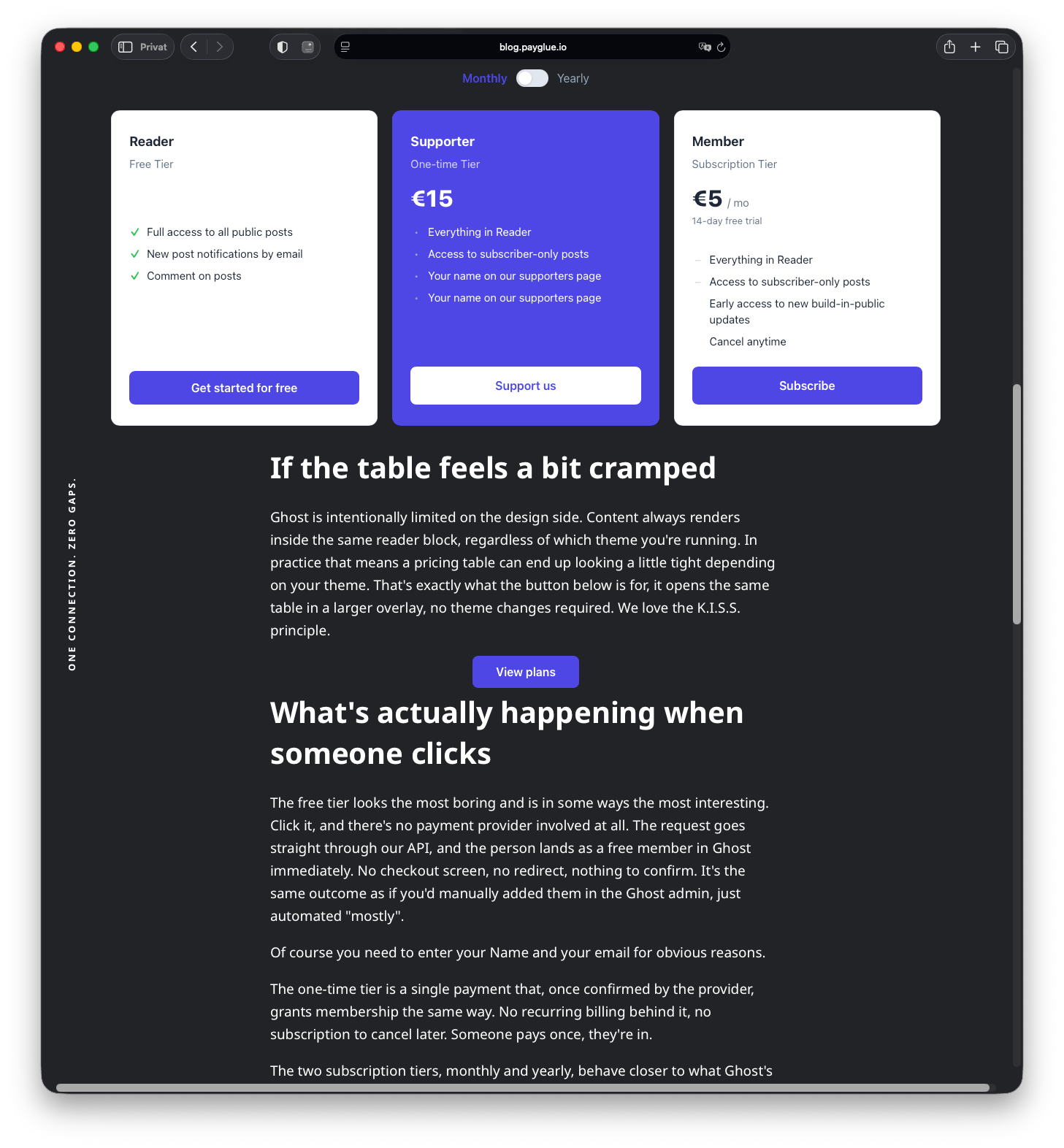
The PayGlue pricing table lets you mix free, one-time, and subscription tiers into a single table and embed it anywhere on your Ghost site with one script tag. No Stripe connection required.
 ## Create a pricing table
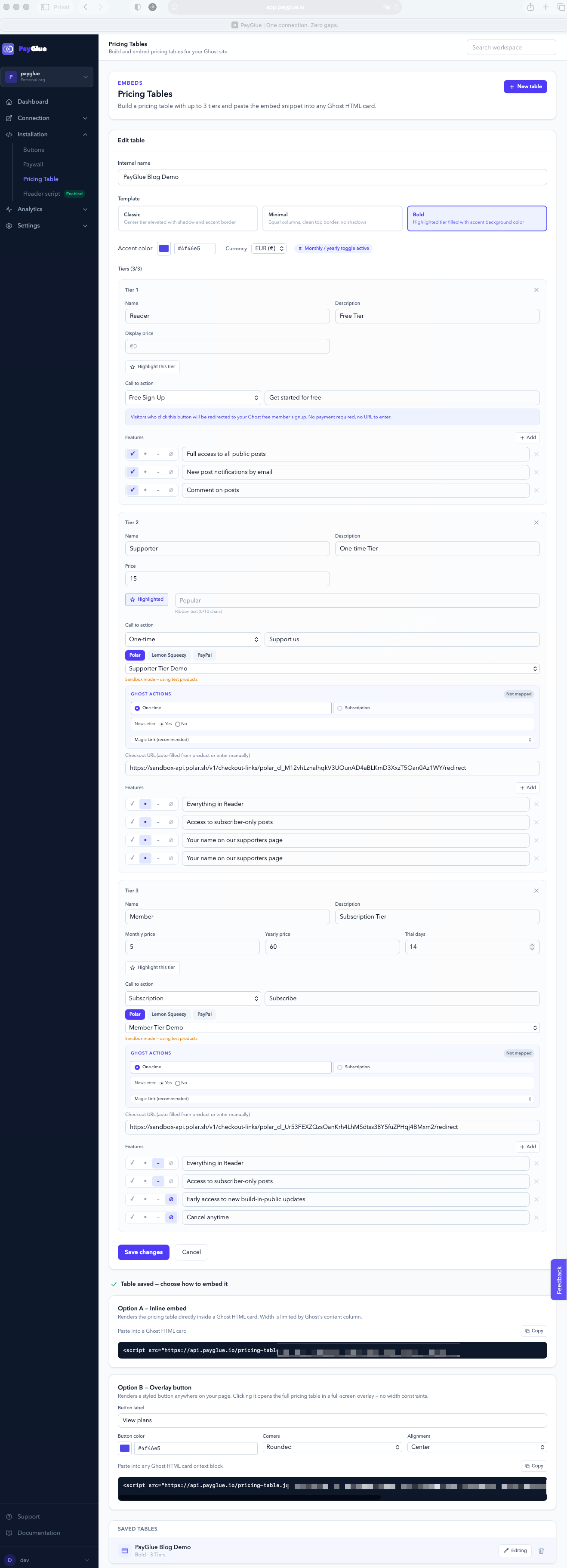
1. Open the **Pricing Table** section in your PayGlue dashboard under **Installation > Pricing Table**.
2. Click **New table**.
3. Give your table a name (internal only).
4. Pick a **template**: Classic, Minimal, or Bold.
5. Set an **accent color** for buttons, toggle, ribbon badge, and highlighted card.
6. Add up to 5 tiers. Each tier has its own CTA type (see below).
7. Click **Save**.
## Create a pricing table
1. Open the **Pricing Table** section in your PayGlue dashboard under **Installation > Pricing Table**.
2. Click **New table**.
3. Give your table a name (internal only).
4. Pick a **template**: Classic, Minimal, or Bold.
5. Set an **accent color** for buttons, toggle, ribbon badge, and highlighted card.
6. Add up to 5 tiers. Each tier has its own CTA type (see below).
7. Click **Save**.
 ## CTA types
Each tier can have one of four call-to-action types:
| Type | What happens on click |
| ---------------- | ------------------------------------------------------------------------------------------- |
| **Free sign-up** | Opens your Ghost free member signup portal. No payment required, no URL to enter. |
| **One-time** | Links to a one-time payment checkout from your connected payment provider. |
| **Subscription** | Links to a recurring subscription checkout from your connected payment provider. |
| **Custom URL** | Links to any URL you enter. Works for Pay What You Want (PWYW) links or external checkouts. |
For **One-time** and **Subscription**, select a product from your provider catalog — the checkout URL fills automatically.
## Monthly / yearly toggle
Enable **Show monthly / yearly toggle** to let visitors switch between billing periods. Set a separate price per tier for each period. If a tier has no yearly price, it shows the monthly price in both views.
## Highlight and ribbon badge
Toggle **Highlight this tier** on any tier to visually emphasize it. When highlight is on, a ribbon badge appears in the corner. The default text is **Popular** (max 10 characters). You can change it to anything that fits your copy.
## Embed options
Once your table is saved, two embed snippets appear.
### Option A — Inline embed
Paste this into a Ghost **HTML card**. The table renders inline in your post or page and automatically breaks out of Ghost's content column to full viewport width.
```html theme={null}
```
### Option B — Overlay button
Paste this into any Ghost **HTML card or text block**. It renders a styled button. Clicking the button opens the full pricing table in a full-screen modal overlay, with no width constraints.
```html theme={null}
```
**Overlay button styling options** (set in the dashboard, reflected in the snippet automatically):
| Option | Values | Default |
| ------------ | -------------------------------------------- | ------------ |
| Button label | Any text | `View plans` |
| Button color | Any hex color | `#4f46e5` |
| Corners | `md` (rounded), `full` (pill), `none` (flat) | `md` |
| Alignment | `left`, `center`, `right` | `center` |
## Tips
**Ghost clips content with overflow hidden.** The inline embed handles this automatically by removing `overflow: hidden` from ancestor elements on load. You do not need to edit your Ghost theme.
**Toggle not changing prices?** Make sure you have entered a value in the **Yearly price** field for each subscription tier. If the field is empty, the monthly price is shown in both views.
**Using the overlay button as an alternative to inline.** If your Ghost theme makes inline embeds look cramped, use the overlay button instead. The modal overlay has no theme constraints and always looks clean.
## CTA types
Each tier can have one of four call-to-action types:
| Type | What happens on click |
| ---------------- | ------------------------------------------------------------------------------------------- |
| **Free sign-up** | Opens your Ghost free member signup portal. No payment required, no URL to enter. |
| **One-time** | Links to a one-time payment checkout from your connected payment provider. |
| **Subscription** | Links to a recurring subscription checkout from your connected payment provider. |
| **Custom URL** | Links to any URL you enter. Works for Pay What You Want (PWYW) links or external checkouts. |
For **One-time** and **Subscription**, select a product from your provider catalog — the checkout URL fills automatically.
## Monthly / yearly toggle
Enable **Show monthly / yearly toggle** to let visitors switch between billing periods. Set a separate price per tier for each period. If a tier has no yearly price, it shows the monthly price in both views.
## Highlight and ribbon badge
Toggle **Highlight this tier** on any tier to visually emphasize it. When highlight is on, a ribbon badge appears in the corner. The default text is **Popular** (max 10 characters). You can change it to anything that fits your copy.
## Embed options
Once your table is saved, two embed snippets appear.
### Option A — Inline embed
Paste this into a Ghost **HTML card**. The table renders inline in your post or page and automatically breaks out of Ghost's content column to full viewport width.
```html theme={null}
```
### Option B — Overlay button
Paste this into any Ghost **HTML card or text block**. It renders a styled button. Clicking the button opens the full pricing table in a full-screen modal overlay, with no width constraints.
```html theme={null}
```
**Overlay button styling options** (set in the dashboard, reflected in the snippet automatically):
| Option | Values | Default |
| ------------ | -------------------------------------------- | ------------ |
| Button label | Any text | `View plans` |
| Button color | Any hex color | `#4f46e5` |
| Corners | `md` (rounded), `full` (pill), `none` (flat) | `md` |
| Alignment | `left`, `center`, `right` | `center` |
## Tips
**Ghost clips content with overflow hidden.** The inline embed handles this automatically by removing `overflow: hidden` from ancestor elements on load. You do not need to edit your Ghost theme.
**Toggle not changing prices?** Make sure you have entered a value in the **Yearly price** field for each subscription tier. If the field is empty, the monthly price is shown in both views.
**Using the overlay button as an alternative to inline.** If your Ghost theme makes inline embeds look cramped, use the overlay button instead. The modal overlay has no theme constraints and always looks clean.